
Furiendly is a community building platform designed for people who love their pets. Connect with like minded owners and their furry friends.
Local hiking partner? We got you!
Socializing your new pet? No problem!

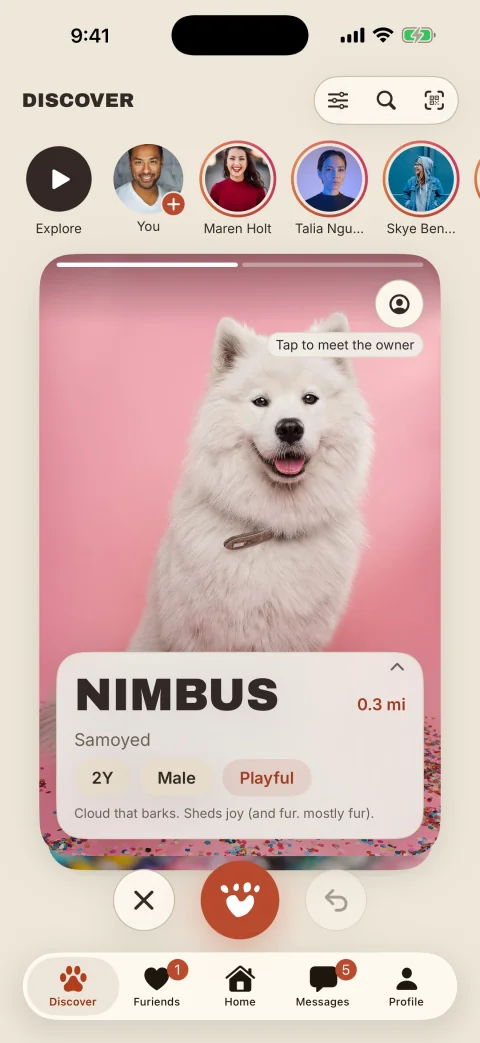
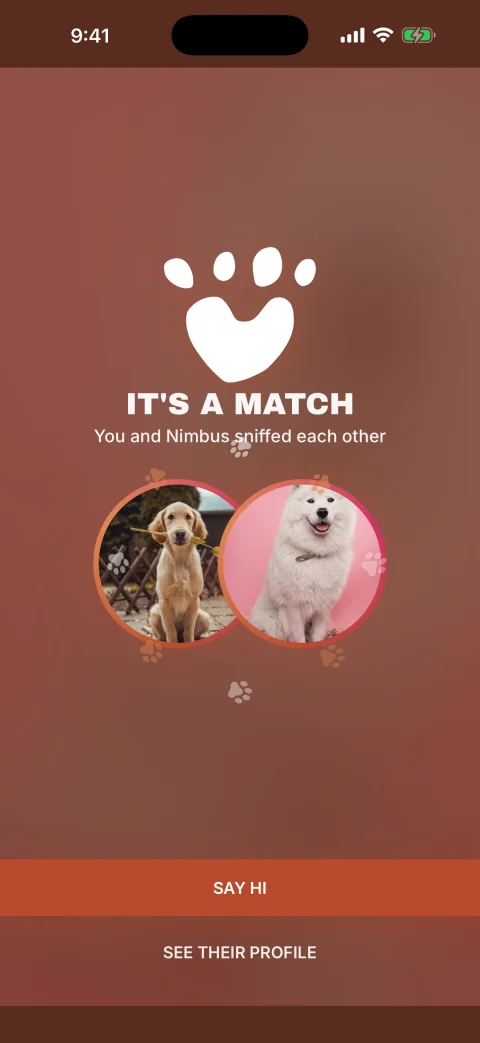
Furiendly is a community-building app for pet owners. You discover pets and their owners nearby, match when the interest is mutual, chat, and meet up: at the park, on a walk, or at one of our curated pet-friendly spots.
Yes. Furiendly is free to download and use, with no subscription or paid tier.
Furiendly runs on iPhone and iPad with iOS 17 or later. Get it on the App Store: https://apps.apple.com/us/app/furiendly/id6473902024
Not yet, but we’re working on it! Furiendly is only on iPhone and iPad currently.
You need to be 18 or older to use Furiendly.
Download the app, then sign in with your phone number (we text you a code) or with ‘Sign in with Apple’. There are no passwords. Set up your own profile and your pet's profile, and you're in.
No. Furiendly is for all pets and the people who love them. Set up a profile for your pet and start finding furiends nearby.
Anywhere in North America. Furiendly shows pets and their people near you, and you can widen your search radius up to 100 miles.
Browse pets nearby in the ‘Discover’ tab. Tap ‘Sniff’ if you'd like to connect, or ‘Pass’ to keep going. Flip the card to see the owner. Sniffs you've received show up in the Furiends tab, and when you both Sniff, that's a ‘WOOF’, aka you're matched and can start chatting.
Yes. Filter pets by gender, size, energy level, age, and whether they're vaccinated or neutered; filter owners by gender and age; and set your search distance and zip code. You can also choose whether cards show the pet or the owner first.
Yes. Add up to three pets to your profile and switch which one is active in the ‘Discover’ tab. Each pet can have up to three breeds, mixed included.
You can chat right away, using text, photos, and voice messages, and go from there: share Stories, start a group chat with your furiends, check in at a spot, or invite them to a meetup.
Stories are photos, short videos (up to 15 seconds), or text posts that disappear after a day, two days, or a week. You pick. By default only your matches can see them; you can also make one public.
Events are meetups you create or get invited to: a park hangout, a group walk, a playdate. Set the time and place, invite your furiends, and RSVP with which pet you're bringing.
Check in when you're at a pet-friendly spot so your matches can see you're there and come say hi. Check-ins are visible only to your matches. They're never public.
The ‘Star of the Week’ section on the ‘Home’ tab is a weekly neighborhood photo contest. Everyone within the contest area can enter one pet-related pic and vote up their favorites; the most-voted pic when the week closes on Sunday evening wins. The winner of each week is then displayed directly on the Home tab.
The ‘Home’ tab shows parks, patios, and other pet-friendly spots and neighborhoods picked by our editors, starting with Los Angeles, New York and Palm Springs. You can save your favorites to your profile.
Other Furiendly users can see your profile and your pet's profile in the ‘Discover’ tab. That's how matching works. Stories default to matches-only, check-ins are always matches-only, and you can hide your profile anytime in Settings, under Visibility.
In the ‘Discover’ tab, search for them by username or scan the QR code from their profile. You can share your own QR code from your profile too.
With your permission, we use your approximate location, only while you're using the app, to show pets nearby, sort by distance, and power check-ins and events. We don't sell it and we don't use it to track you across other apps. You can turn it off in iOS Settings, though nearby features need it.
No. We don't sell your personal information and we don't share it with data brokers or ad networks to track you across other apps or websites. The full details are in our Privacy Policy at befuriendly.com/privacy.
Block or report them from the ‘⋯’ menu on any profile or chat. It takes a couple of taps, and our team reviews every report. Meet new furiends in open, public pet-friendly spots, keep chats in the app until you've met, and always trust your gut.
Yes. In Settings, under Visibility, you can hide your profile. Only people you share your QR code or profile link with can find you. Your matches and chats stay right where they are.
In the app, go to Profile → Settings → Delete account. It's permanent: your profile, pets, photos, matches, and conversations are all removed. If you just need a break, you can hide your profile in Settings instead.
Double-check the number you entered, give it a minute, then request a new code. If texts still aren't coming through, email support@leashedinapp.com and we'll sort it out.
Yes. Push notifications are controlled in iOS Settings. There's a shortcut in the app under Settings → Notifications. You can also turn tips and communications on or off there.
Email support@leashedinapp.com. A real person reads every message.